9 Types of Data Connectors for Marketing Teams in 2026

The AI CMO team
Oct 14, 2026
Your ad dashboard shows one return, your CRM shows another, and the revenue report shows a third. Most marketing teams don't have a reporting problem so much as a connection problem. The type of data connector determines whether spend, customer behavior, and revenue land in the same place, and whether the numbers arrive fresh enough to act on this week.
That choice also affects more than dashboard accuracy. It determines whether a paid-media audience updates in time, whether a lifecycle trigger recognizes a purchase, and whether an AI marketing system can answer a revenue question from consistent rows. The right connector shortens the path from customer activity to marketing decision. The wrong one creates duplicated records, stale segments, silent failures, and debates about which report is correct.
Table of Contents
- 1. Native Pre-Built SaaS Connectors
- 2. Website SDK and First-Party Event Tracking Connectors
- 3. ETL and ELT Pipeline Connectors
- 4. Reverse ETL Connectors
- 5. Webhooks
- 6. REST API Connectors and Custom Integrations
- 7. iPaaS Workflow Connectors
- 8. Marketing Data Aggregator Connectors
- 9. File-Based Connectors
- Comparison of 9 Data Connector Types
- Match Each Connector to the Decision It Serves
1. Native Pre-Built SaaS Connectors
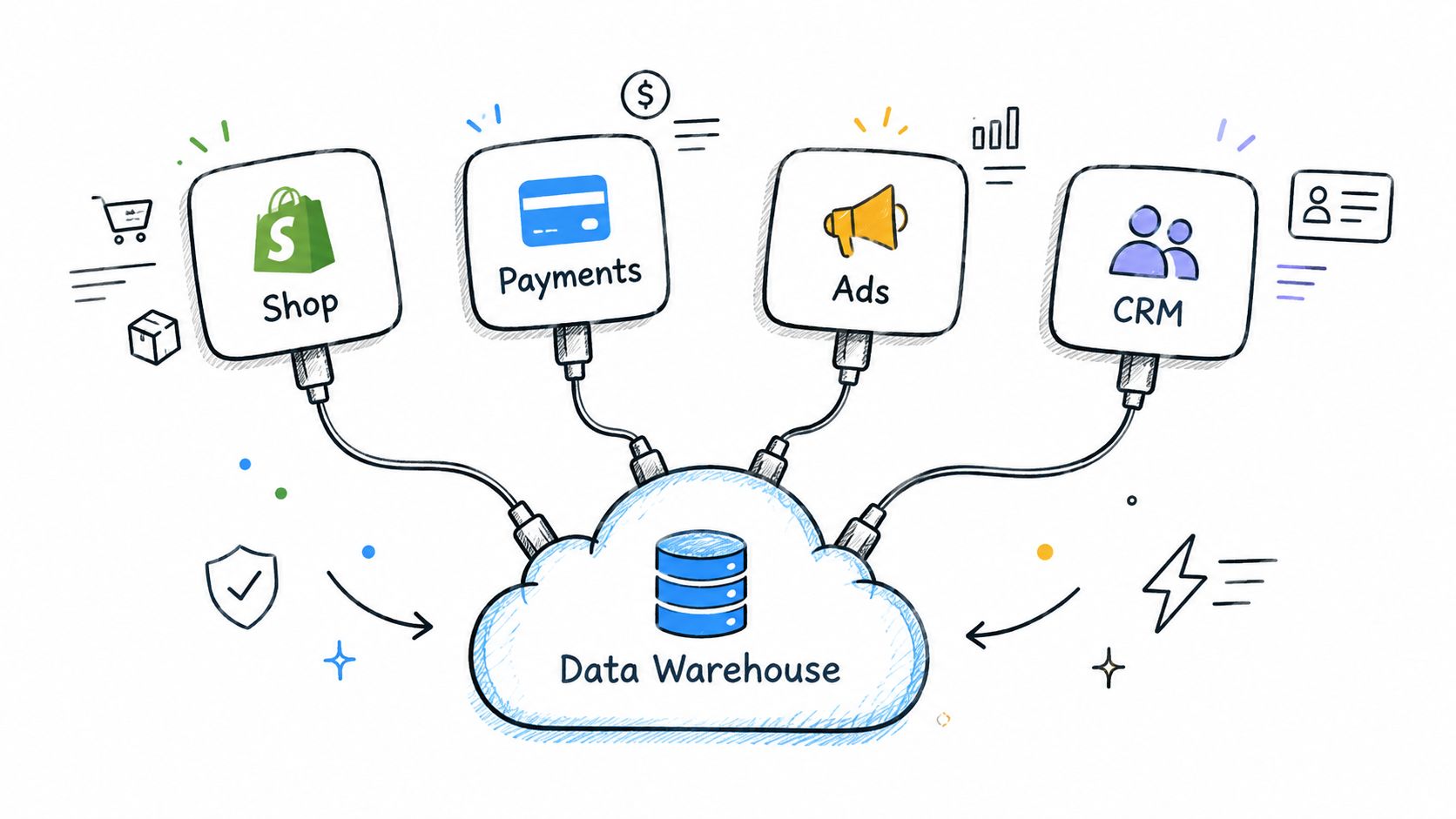
Native SaaS connectors are the fastest route from a familiar marketing application to a warehouse, customer data platform, or activation tool. The vendor maintains the integration, authentication usually runs through OAuth, and marketers select the objects that matter, such as orders, subscriptions, contacts, deal stages, or advertising spend.
A direct Shopify and Stripe connection can bring orders, refunds, and payments into one reporting layer for a DTC brand. A B2B team can connect HubSpot and Salesforce data to its warehouse, then measure pipeline by campaign source without asking an engineer to maintain a custom script.
Where native connectors work best
These connectors suit standard sources with predictable objects and a clear reporting destination. They remove much of the maintenance burden because the provider handles many API changes and schema updates. That makes them especially useful for campaign reporting, revenue reconciliation, and customer-record synchronization.
The limit is control. A native connector may omit an object, restrict historical backfills, flatten important fields, or expose a schema that doesn't match the business's definitions. A successful sync also doesn't prove that revenue or conversions reconcile with the source platform.
- Confirm coverage: Check supported objects, fields, incremental updates, and historical backfill windows before committing.
- Run a source comparison: Reconcile totals against the platform's own report for one test week.
- Use an existing ingestion path: Where a native connector already exists, it generally beats a script that the team must maintain.
- Unify calculations: The AI CMO's Data 360 can ingest sources such as Shopify, Stripe, advertising platforms, and CRMs so MRR, CAC, and ROAS use the same rows across reports.
Practical rule: A connector is ready for production only after its totals match the source and its missing fields are understood.
2. Website SDK and First-Party Event Tracking Connectors
A website SDK connects browser or app behavior to the marketing data layer. It can capture page views, clicks, form submissions, purchases, and identity events, then send them to a customer data platform, warehouse, or analytics environment. Because first-party collection runs on the brand's own domain, it gives the marketing team more control over consent, event definitions, and the relationship between anonymous behavior and known customers.
A SaaS company can identify a visitor at signup and use actual pricing-page and product behavior to trigger a trial-to-paid journey. A retailer can compare cohorts before and after a redesign, provided the tracking plan stayed consistent.
Make the event stream trustworthy
Client-side events are useful but can be lost through browser restrictions, blocked scripts, connectivity issues, or incomplete implementation. Server-side purchase and renewal events provide a stronger record for revenue-critical actions, while the SDK captures the broader behavioral context.
The first step isn't adding every possible event. It is agreeing on a small vocabulary that the website, app, CRM, and warehouse can interpret the same way. A documented event such as Product Viewed or Checkout Started is more useful than dozens of loosely named custom events.
- Write the tracking plan first: Define event names, required properties, identity rules, and consent behavior.
- Test before launch: Verify events in a staging environment and inspect the resulting records in the data layer.
- Pair collection methods: Use server-side events for purchases and renewals, then use client-side events for browsing and interaction context.
- Respect choices immediately: Connect consent status to the SDK from the first page load.
- Use first-party measurement: The AI CMO's Insights module provides first-party web analytics without placing a third-party tag on the site.
Teams that are formalizing this foundation can use this guide to build a first-party data strategy. The connector's honest limit is that it can't repair an inconsistent event taxonomy or infer consent that was never captured.
3. ETL and ELT Pipeline Connectors
ETL and ELT connectors move data from operational systems into a central warehouse. ETL transforms data before loading it, while ELT loads raw data first and transforms it inside the destination. For marketing teams, both patterns support the same strategic outcome: ad platforms, email tools, CRMs, product databases, and finance systems can contribute to one reporting model.
A growth team might use Fivetran to load Google Ads, Meta, and LinkedIn spend into Snowflake, then build one blended CAC model. A startup could use Airbyte to replicate its Postgres product database into BigQuery for cohort analysis. The connector isn't the final answer. The warehouse model determines whether the team can trust the answer.
Match freshness to the marketing decision
The global data-integration market was estimated at $15.18 billion in 2024 and projected to reach $30.27 billion by 2030, with a 12.1% compound annual growth rate, according to Peliqan's data integration statistics. The same source estimated the ETL market at $10.24 billion in 2026, projecting $21.25 billion by 2031 at a 15.72% CAGR. Those figures describe a broad infrastructure category, not a reason to make every marketing pipeline real time.
A paid-media dashboard may need frequent spend updates, while finance reconciliation and CRM reporting can often run on a daily schedule. Batch operational integration appeared in 40% of organizations surveyed, compared with 22.9% for real-time projects, while manual scripting remained common at 54.7%, according to a Talend and TDWI integration survey.
- Set schedules by consequence: Use shorter intervals for decisions that change campaigns or journeys, and longer windows for backfills.
- Watch volume and freshness: Failed syncs and unexpected row changes can leave dashboards displaying old data.
- Keep raw data available: Transform it in a controlled layer with consistent naming conventions.
- Define metrics once: Store one governed definition of revenue and conversion in the warehouse.
A centralized model supports the single customer view, while data synchronization for sellers illustrates why recurring state alignment matters beyond a one-time migration.
4. Reverse ETL Connectors
Reverse ETL sends modeled warehouse data back into operational tools. Instead of bringing ad spend, orders, or product usage into the warehouse, it pushes calculated audiences, lead scores, lifetime-value tiers, and churn flags into advertising platforms, email systems, CRMs, and support desks.
That direction matters because analysis only creates value when a team can act on it. An ecommerce brand can send a warehouse-defined “high-LTV, lapsing” segment to Meta each morning. A B2B company can write product-qualified-lead scores into Salesforce so representatives see priority accounts when they open a record.
Turn a shared model into an activation rule
The strongest starting point is one segment with a clear decision attached. A lapsing-buyer audience can support a retention campaign. A trial segment with recent product activity can trigger sales outreach. A suppression segment can prevent unnecessary advertising or messaging.
Reverse ETL's limit is that a correct warehouse model can still produce a poor activation if identifiers don't match, permissions are incomplete, or downstream platforms apply their own audience rules. It also creates a new path for consent and deletion failures if governance stops at the warehouse.
- Start narrow: Choose one high-value audience instead of syncing every model.
- Document lineage: Record which model feeds each destination and field.
- Protect suppression: Remove opted-out contacts before they reach an ad or messaging system.
- Check match quality: Review audience match behavior after each sync to catch identifier problems early.
- Keep one definition: A shared customer record, such as the one maintained in The AI CMO, can keep email, advertising, and support aligned.
A warehouse segment isn't an audience until the destination receives it, recognizes the identity, and applies the right permission.
5. Webhooks
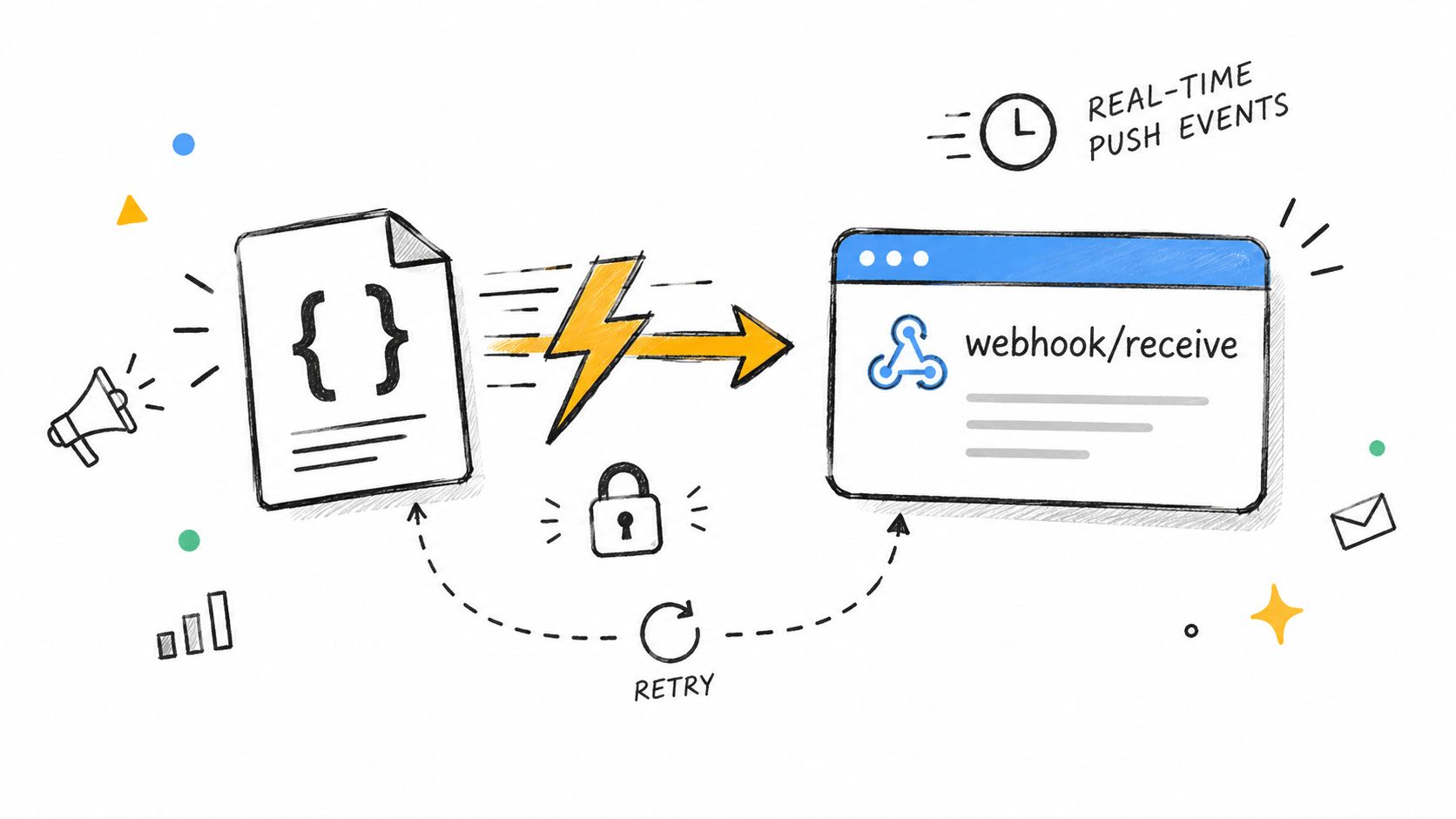
Webhooks push an event to a destination when it happens. A payment failure, order, form submission, subscription cancellation, or shipment update can reach a marketing endpoint without waiting for a scheduled API pull.
That makes webhooks valuable for lifecycle marketing. Stripe can send a payment-failed event that starts a recovery sequence within minutes. A fulfillment provider can send an order-shipped event that triggers a post-purchase message with tracking information. The marketing decision is immediate because the connector follows the business event rather than a calendar.
Design for retries and replay
A webhook is not a complete event platform. Providers can retry deliveries, networks can fail, payloads can change, and downstream services can become unavailable. A handler that sends an email before recording the event may send duplicates when the provider retries.
The reliable pattern is simple. Verify the signature, accept the request quickly, store the raw payload, and process it asynchronously. The handler should be idempotent, meaning the same event can arrive more than once without creating a second purchase, refund, or message.
- Verify every request: Reject unsigned or invalidly signed payloads.
- Acknowledge quickly: Return a successful response and move heavier processing to a queue or worker.
- Store the original: Preserve raw payloads for debugging and replay.
- Prevent duplicate actions: Use a provider event ID or another stable key.
- Use business events deliberately: Stripe and Shopify webhooks work well for purchases, refunds, renewals, and payment failures.
The honest limit is coverage. A webhook can tell a system what changed, but it may not include the full customer history needed for segmentation. Teams often pair it with an API lookup or warehouse record. Webhook capabilities offer a useful reference point for understanding this push-based pattern.
6. REST API Connectors and Custom Integrations
A reporting team may need ad spend from several platforms in one table, while a SaaS team may need to create a contact as soon as a user qualifies for a promotion. REST API connectors support both decisions by reading and writing data through HTTP endpoints. They let teams select fields, set request frequency, transform records, and control activation logic instead of accepting the limits of a fixed integration. NIST describes REST as a framework for interfaces connecting cloud services, containers, and high-performance computing environments in its data-exchange standards research.
The same control can support governed internal AI agents. An agent may read approved marketing records or perform limited actions through defined API permissions, while the surrounding system records what it requested and changed.
Choose a custom integration when a native connector is unavailable or cannot express the business rule. The trade-off is ownership. Your team must maintain authentication, pagination, rate limits, retries, schema changes, logging, and security as the provider evolves.
Start with the decision, then define the smallest reliable interface:
- Protect credentials: Keep API keys and OAuth secrets in a secrets manager, never in browser code.
- Respect provider limits: Use exponential backoff and incremental cursors rather than requesting full datasets repeatedly.
- Create an audit trail: Record request types, response statuses, record counts, and failures.
- Minimize access: Grant only the permissions required, then rotate credentials on a schedule.
- Check documentation: A platform with a documented REST API and role-based access, such as The AI CMO's Connections and REST API, gives internal systems clearer boundaries.
The honest limit is maintenance capacity. A small team may gain precise audience or reporting logic, but a poorly monitored integration can stop refreshing data.
The first implementation should be a read-only pull for one business-critical object. Reconcile its records with the source, test recovery after a failed request, and add write access only when those checks work consistently.
7. iPaaS Workflow Connectors
A lead submits a Typeform form, enters HubSpot, and prompts a sales-channel alert within seconds. Zapier, Make, and Workato support this kind of event-driven handoff through visual trigger-and-action workflows. They can watch for a new form entry, closed deal, purchase, or webinar attendance, then create a contact, send a Slack notification, or assign a task elsewhere.
For lifecycle marketing, the decision is speed. A mid-market company can route webinar attendees into nurture tracks using attendance and job title, shortening the path from engagement to follow-up. The same pattern can send a qualified lead to sales while preserving a clear operational trigger.
Use an iPaaS connector for routing and light automation. Keep high-volume extraction, transformation, identity resolution, lead scoring, and audience definitions in a warehouse or customer record. Workflows become harder to govern when they carry large datasets or business logic that several teams need to inspect.
The visual builder makes setup accessible, but it can conceal dependencies. A renamed field, disabled account, expired token, or changed filter may stop a critical path without changing the marketing dashboard.
Before publishing, apply a small operating discipline:
- Name every workflow: Record its owner, trigger, destination, and business purpose.
- Add failure alerts: Critical paths need a visible fallback notification.
- Test safely: Use a sandbox or test record before activating live automation.
- Keep logic centralized: Store identity, scoring, and audience rules in the customer record or warehouse.
- Reserve the tool for routing: Use a warehouse connector for high-volume extraction and transformation.
The honest limit is observability. A narrow workflow with an easily verified result is safer than a web of dependent automations. Teams comparing options can use this guide to evaluate CRM integration tools.
8. Marketing Data Aggregator Connectors
A weekly client report may pull Google, Meta, LinkedIn, and TikTok data into separate tabs, with each platform using different field names and attribution settings. Marketing data aggregators such as Supermetrics and Funnel.io reduce that manual work by normalizing impressions, clicks, spend, and conversions for spreadsheets, dashboards, or warehouses.
Their strongest use case is cross-channel reporting. An agency can reuse one reporting structure across clients, while a DTC brand can review campaign performance in one view. The output remains only as consistent as the inputs. UTM conventions, conversion definitions, date ranges, and account access need agreement before the connector is useful.
Choose this type when the decision is where to adjust channel investment, pacing, or campaign execution. It can reveal that one channel is spending faster, generating fewer conversions, or producing a different mix of results. It cannot determine whether a reported conversion represents revenue, a qualified lead, or an attributed event in the financial model.
Treat the aggregator as a reporting and normalization layer. First-party orders, refunds, and customer records should anchor revenue calculations, including business-level ROAS and CAC. Platform attribution windows, timezones, and imported conversions can produce different totals for the same campaign.
Start with a small reporting model:
- Set the taxonomy: Agree on UTM values and campaign names before connecting accounts.
- Reconcile totals: Compare spend and conversions with native platform reports.
- Anchor revenue: Use verified first-party revenue for ROAS and CAC.
- Limit the feed: Connect only the accounts and metrics tied to active decisions.
- Compare models: Check aggregator outputs against the warehouse so recurring questions have one agreed answer.
The honest limit is definition drift. An aggregator can make inconsistent numbers look orderly, so it works best after the team agrees on what each metric means.
9. File-Based Connectors
A retailer may receive an SFTP file of in-store transactions from its point-of-sale provider, while an events team uploads badge scans into the CRM after each trade show. Those files can connect offline activity with online customer records and trigger appropriate nurture flows, even when the source has no usable API.
File-based connectors support CSV, Excel, JSON, and XML through manual uploads, SFTP, cloud storage, or linked spreadsheets. Their value is controlled bulk exchange. They suit partners, retailers, offline sales teams, event providers, and legacy systems that still operate through scheduled files.
Use this type when the marketing decision depends on periodic enrichment, audience refreshes, or reconciliation of offline transactions. It is a poor fit for purchase-triggered messages or urgent suppression updates because delivery depends on the next file and its validation.
The practical risk is silent inconsistency. Manual edits can change column names, dates, identifiers, or consent fields. Repeated uploads may create duplicates, and a missing file can leave a dashboard stale.
Before connecting a source, agree on a small exchange contract:
- Define the schema: Specify required columns, formats, data types, and acceptable empty values.
- Choose an identifier: Use an agreed email, customer ID, transaction ID, or another stable key for deduplication.
- Log every import: Record the source, date, row count, validation result, and responsible person or process.
- Check permissions: Confirm consent and suppression status before an imported contact enters a messaging audience.
- Schedule delivery: Prefer SFTP or cloud storage over manual uploads when the source supports recurring delivery.
- Join records centrally: Route offline transactions and online behavior through a shared customer data layer.
A practical file-format guide can help document the exchange contract. Start with one recurring file, validate its rows against the source system, and measure whether the resulting audience or report supports a real decision.
Comparison of 9 Data Connector Types
| Connector | Core features | Value & strengths | Limitations & risks | Best fit / common use | Cost & maintenance |
|---|---|---|---|---|---|
| Native (Pre-Built) SaaS Connectors | OAuth auth, prebuilt schemas, scheduled syncs, vendor-managed updates, selective table/field sync | Fast setup, low maintenance, non‑technical friendly, vendor handles API changes | Limited objects/fields, API rate limits, limited transform control, variable coverage by source | Marketers connecting Shopify, Stripe, Ads, CRMs for quick dashboards and reports | Low dev cost, vendor subscription; predictable upkeep |
| Website SDK & First‑Party Event Tracking | JS/mobile SDK, page/click/form events, identify calls, client/server delivery, consent-aware collection | Real‑time behavioral data, resilient to cookie changes, enables immediate journeys and attribution | Requires dev implementation, tracking plan drift, client blockers, consent misconfig | Product/DTC sites, teams needing real‑time journeys and accurate funnels | Dev time + governance; low recurring fees, maintain tracking plan |
| ETL / ELT Pipeline Connectors | Hundreds of sources, CDC/incremental, auto schema detection, loads to warehouses (BigQuery/Snowflake/ClickHouse) | Centralizes data, supports backfills, enables consistent modeling and analytics | Usage-based pricing at scale, latency by schedule, needs downstream modeling (dbt/SQL) | Warehouse-first analytics, enterprise reporting, cross‑channel modeling teams | Usage/rows pricing; requires engineering for transforms |
| Reverse ETL Connectors | Push warehouse models to apps, audience/attribute mapping, scheduled or event syncs, change detection | Activates warehouse segments in ads/CRM, keeps audiences consistent, analyst-owned logic | Depends on clean warehouse, destination API limits, potential field conflicts | Activation (ads, email, CRM), lifecycle automation, analyst-driven ops | Mid cost; depends on audience volume and sync frequency |
| Webhooks | Event-driven JSON callbacks, configurable events, retries, signature verification, low latency | Near real‑time triggers, lightweight, cheap, ideal for timely journeys (dunning, shipping) | Delivery failures/out‑of‑order, harder debugging, secure/monitored endpoints required | Time-sensitive flows and lightweight integrations | Low infra cost; needs monitoring and idempotent handlers |
| REST API & Custom Integrations | Standard HTTP methods, full field control, auth (API key/OAuth), pagination, rate limits | Fully flexible, covers any API, supports bidirectional writes and custom logic | Requires dev skills, maintenance for API changes, security risks (exposed keys) | Bespoke integrations, internal systems, when native connectors absent | High dev and maintenance cost; needs secrets management |
| iPaaS Workflow Connectors (Zapier/Make/Workato) | Visual no‑code builders, thousands of app connectors, triggers/filters, task history | Fast to build without engineers, broad app coverage, great for routing and notifications | Costs rise with task volume, complex workflows hard to audit, not for high-volume ETL | Small teams, ops automations, lead routing, lightweight integrations | Task‑based pricing; low initial cost but can scale up quickly |
| Marketing Data Aggregator Connectors | Prebuilt ad/social connectors, metric normalization, destinations (Sheets, BI, warehouse), scheduled refresh | Fast cross‑channel reporting, consistent metric defs, agency-friendly templates | Normalization can lose platform nuances, cost grows with connections, may diverge from single source of truth | Agencies and performance teams needing multi‑channel dashboards | Subscription per source/destination; moderate ongoing cost |
| File‑Based Connectors (CSV / SFTP / Sheets) | Manual upload / SFTP / cloud pickup, CSV/Excel/JSON support, field mapping, bulk historical loads | Works with offline partners and legacy systems, simple for non‑technical users, good for backfills | Manual errors, no real‑time, schema breaks, spreadsheet edits cause drift | Offline events, partner reports, historical backfills, trade show leads | Low direct cost; high manual overhead unless automated via SFTP/cloud storage |
Match Each Connector to the Decision It Serves
The most useful way to compare types of data connectors is to start with the decision, not the application list. A paid-media audience may need a modeled segment and reliable suppression. A lifecycle journey may need a purchase or payment event within minutes. A cross-channel report may need consistent spend definitions and a verified revenue table. Those decisions point to different connector patterns.
Native connectors work well for standard SaaS sources such as Shopify, Stripe, advertising platforms, CRMs, and common reporting tools. Website SDKs capture live behavioral context, while server-side events protect revenue-critical actions. Webhooks handle immediate business events. ETL and ELT pipelines create the shared analytical layer, and reverse ETL returns trusted segments and scores to the tools that marketers use every day.
Files still deserve a place in the architecture. They can be the safest option for a controlled partner exchange or a legacy point-of-sale feed, especially when the business defines the schema, validates consent, and records every import. Real time isn't automatically superior. It can add cost, duplicate events, operational complexity, and privacy exposure when the decision only requires a daily update.
The selection criteria should therefore include freshness, volume, replayability, schema evolution, identity resolution, rate limits, deletion propagation, and recovery behavior. A connector that reports “success” can still lose records, alter a field's meaning, or fail to carry a suppression status. Data quality was identified as the leading data-integrity challenge by 64% of respondents in research from Precisely, while 45% cited inconsistent definitions and formats. Those findings reinforce a practical point: transport is only one part of trust.
Marketing teams also feel this problem directly. 65.7% of respondents in the 2025 State of Your Stack Survey identified data integration as one of their biggest martech-stack management challenges. An EMARKETER and Zeta Global report found that CDPs were considered the most significant contributor to martech integration by 52.2% of marketers, while APIs and middleware reached 50%. The practical response isn't adding every available connector. It is choosing fewer, clearer paths that preserve customer identity, consent, history, and business meaning.
Start with one high-value flow. Reconcile it against source reporting for a week, test a delayed and duplicated event, confirm that an opt-out propagates, and expand only after the numbers match. On The AI CMO, Data 360 and the customer record keep connected sources on one set of rows, so reports and AI answers can draw from the same figures rather than competing copies.
The AI CMO combines Data 360, Customer 360, first-party website analytics, journeys, and connections for sources such as Shopify, Stripe, advertising platforms, CRMs, files, webhooks, and APIs. Visit The AI CMO to connect marketing data to shared customer records, governed segments, and actions that stay within the team's approvals.
Share this article